Moving from Spreadsheets to ERP: Data Migration and Opening Balance Checklist
M Maria August 31, 2026 11 min read
Are your spreadsheets still carrying your business’s accounting history?
Moving from spreadsheets to an ERP can improve financial control and reporting, but poor migration can create costly accounting errors. For UAE SMEs, ERP data migration UAE projects should go beyond importing Excel files. Businesses need to clean historical data, map the chart of accounts, transfer customer and supplier balances, reconcile opening balances, and maintain appropriate accounting records.
A structured migration process helps ensure the new ERP starts with accurate, reliable data. By planning, testing, and reconciling before go-live, UAE SMEs can move from spreadsheets to ERP with greater confidence and fewer financial disruptions.
Let’s look at how to plan the migration, prepare opening balances and verify the new ERP before going live.
What Is ERP?
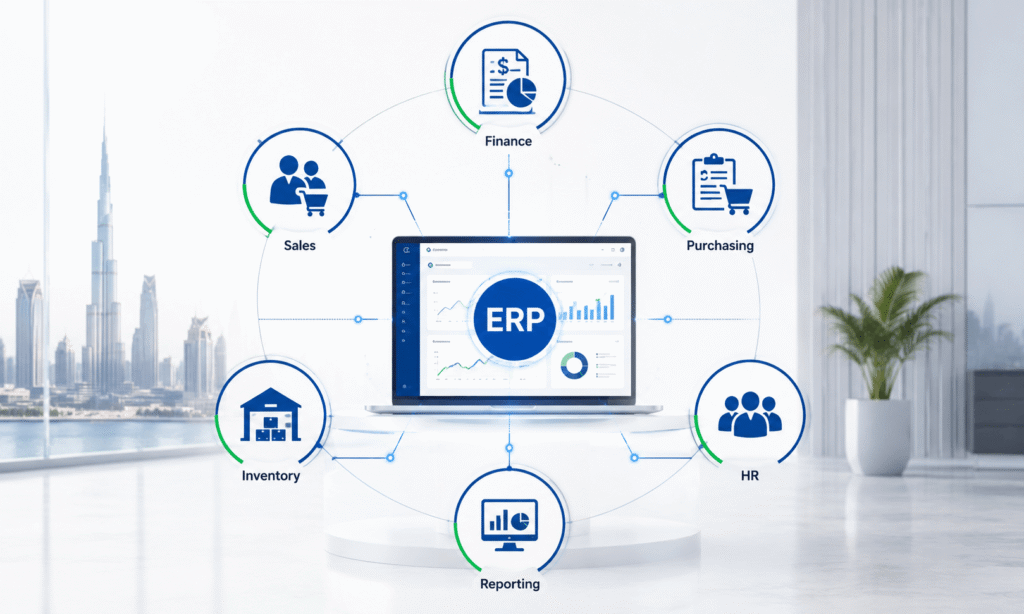
ERP stands for Enterprise Resource Planning. An ERP system is business software that brings different business functions into one central system, instead of managing them through separate spreadsheets or applications.
For example, an ERP can manage:
Accounting & finance: invoices, expenses, bank transactions, financial reports
Sales: customers, orders and invoices
Purchasing: suppliers and purchase orders
Inventory: stock levels and movements
Payroll/HR: employee and payroll information
Reporting: dashboards and business performance
Why UAE SMEs Move From Spreadsheets to ERP
Spreadsheets can work well when a business is small, but problems often appear as transaction volumes and teams grow. A company may have separate spreadsheets for:
Sales
Purchases
Customer balances
Supplier balances
Inventory
Expenses
Payroll
Bank transactions
Fixed assets
Management reporting
Over time, these files can become difficult to control. Different employees may use different formulas, account names or versions of the same file.
An ERP system can centralise these processes and provide a common financial database. However, the benefits depend heavily on the quality of the information transferred into the system.
A poorly planned spreadsheet to ERP migration can result in duplicate customers, incorrect account mappings, missing invoices, inaccurate inventory, and incorrect opening balances.
Therefore, migration should be treated as an accounting project as well as a technology project.
What Accounting Data Should You Migrate?
Not every historical spreadsheet needs to be transferred exactly as it appears.
Before migration, classify information into three categories:
Data that must be migrated
Data that should be retained for reference
Data that can be archived without being imported
This prevents the new ERP from becoming a storage location for years of unnecessary or unreliable spreadsheet data.
Key accounting data normally includes:
Chart of accounts
Customer master data
Supplier master data
Open sales invoices
Open purchase invoices
Bank balances
Inventory balances
Fixed assets
Loans and liabilities
Equity balances
Tax-related balances
Opening trial balance
Relevant historical transactions
The exact migration scope depends on the ERP, reporting requirements, business activity and the level of historical detail management wants to retain.
Step-by-Step ERP Data Migration UAE Process for SMEs
A successful ERP migration checklist should follow a controlled sequence.
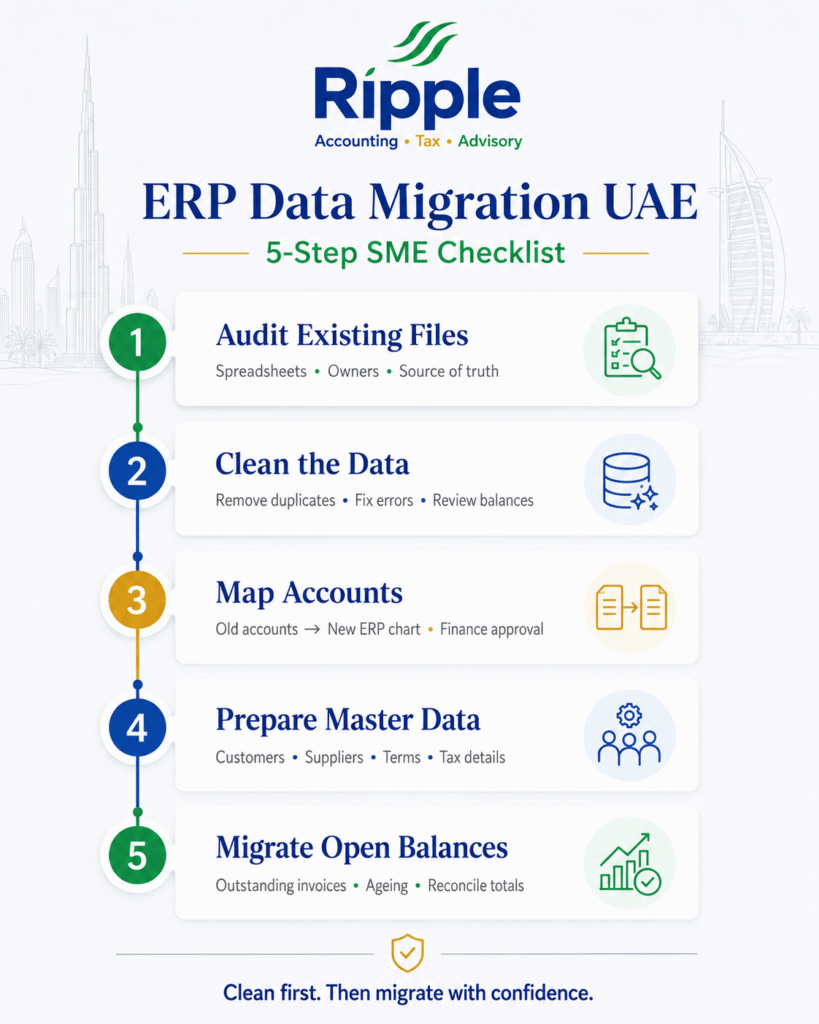
Step 1: Audit the Existing Spreadsheets
Start by identifying every spreadsheet currently used by the finance team.
Ask:
Who owns each file?
What information does it contain?
Is the information duplicated elsewhere?
Which file is considered the source of truth?
Are formulas being used?
Are there manual adjustments?
Are historical balances reconciled?
Do not begin importing files before understanding what they contain.
For example, if customer balances appear in both an accounts-receivable spreadsheet and a separate sales tracker, determine which source is authoritative before migration.
Step 2: Clean the Accounting Data
Data cleaning is one of the most important stages of accounting data migration. Look for:
Duplicate customers
Duplicate suppliers
Inactive accounts
Missing account codes
Incorrect dates
Invalid VAT numbers
Inconsistent customer names
Negative or unusual balances
Duplicate invoices
Blank fields
Incorrect account classifications
Example
Suppose one customer appears in the spreadsheet as:
ABC Trading LLC
and elsewhere as:
ABC Trading
If both records are imported separately, the ERP could show two customer accounts for the same business.
Clean the master data before importing it.
Step 3: Map the Chart of Accounts
The old spreadsheet structure may not match the ERP’s chart of accounts.
Create a mapping document showing:
Old Account
New ERP Account
Sales
Revenue – Sales
Office Expenses
Administrative Expenses
Rent
Rent Expense
Bank Charges
Bank Charges
Customer Receivables
Trade Receivables
Supplier Payables
Trade Payables
Do not simply rename accounts without considering their accounting treatment.
The finance team should approve the mapping before migration.
This is particularly important because the chart of accounts affects financial statements and management reporting.
Step 4: Prepare Customer and Supplier Data
Customer and supplier master data should be standardised before migration. Depending on the ERP, information may include:
Legal name
Contact information
Tax registration information
Payment terms
Currency
Credit limit
Address
Customer/supplier classification
Avoid importing old, inactive records unless there is a genuine reporting or operational reason to retain them in the live ERP.
Step 5: Prepare Open Receivables and Payables
One of the most important parts of opening balance migration is transferring outstanding invoices.
Suppose the old system shows:
Customer A: AED 40,000 outstanding
Customer B: AED 25,000 outstanding
Customer C: AED 15,000 outstanding
The new ERP should be able to reconcile to the same total of AED 80,000, subject to the agreed migration method.
Where detailed ageing is required, open invoices should be migrated with appropriate information such as:
Invoice number
Invoice date
Due date
Customer
Original amount
Outstanding amount
VAT information where applicable
The same principle applies to supplier balances.
What Are Opening Balances in Accounting?
Opening balances represent the financial position carried into the new accounting system at the migration date. They effectively create the bridge between the old accounting environment and the new ERP. Typical opening balances include:
Cash and bank
Trade receivables
Trade payables
Inventory
Fixed assets
Loans
Accrued liabilities
Prepayments
VAT balances
Other assets and liabilities
Share capital
Retained earnings
Other equity accounts
The most important control is simple:
The opening trial balance must balance.
If total debits do not equal total credits, the ERP should not be treated as ready for financial posting.
Opening Balance Migration Checklist
Before approving the opening balances, review each major balance-sheet category.
Bank Accounts
Reconcile the balance being imported with the latest approved bank reconciliation. Check for:
Outstanding cheques or payments
Deposits in transit
Bank charges
Unrecorded transactions
Accounts Receivable
Reconcile customer-level balances to the general ledger. Check:
Open invoices
Credit notes
Customer advances
Overdue balances
Ageing
Accounts Payable
Compare supplier-level balances with the general ledger. Check:
Unpaid invoices
Supplier credits
Advances
Duplicate invoices
Due dates
Inventory
Verify:
Quantity
Unit cost
Total value
Warehouse/location
Obsolete inventory
Inventory adjustments
Inventory should be reconciled to the approved closing records before being imported.
Fixed Assets
Review:
Asset description
Purchase cost
Accumulated depreciation
Net book value
Acquisition date
Depreciation method
Loans and Other Liabilities
Verify principal balances, accrued amounts and relevant supporting documentation.
Equity
Check share capital, retained earnings and other equity balances against the approved closing financial statements.
How to Validate Opening Balances Before Go-Live
Do not rely solely on the ERP import confirmation. Perform an independent reconciliation.
Use this sequence:
Old system closing balance → Migration file → ERP opening balance → Reconciliation → Management approval
For example:
Account
Old System
ERP Opening
Difference
Bank
AED 300,000
AED 300,000
AED 0
Receivables
AED 450,000
AED 450,000
AED 0
Payables
AED 220,000
AED 220,000
AED 0
Inventory
AED 180,000
AED 180,000
AED 0
Every material difference should be investigated. The finance team should also generate a trial balance from the ERP and compare it with the approved closing trial balance from the old system.
UAE Accounting and Record-Keeping Considerations
ERP migration has a specific compliance dimension for UAE businesses.
The Federal Tax Authority published FTA Decision No. 4 of 2026 on the Rules and Requirements for Maintaining the Information Contained in Accounting Records and Commercial Books. The official FTA page provides the decision and its PDF, making it the most directly relevant government document for businesses reviewing how accounting information is maintained.
This is worth reviewing during an ERP migration because businesses should consider how the new system will maintain, preserve and retrieve accounting information and supporting records.
The FTA also explains that businesses must maintain records that allow the Authority to identify business activities and review transactions.
For VAT-registered businesses, FTA guidance identifies records such as supplies and imports, tax invoices, credit notes and VAT records among the information that may need to be maintained.
Therefore, don’t treat the ERP migration as an opportunity to simply delete old accounting information. Establish an appropriate migration and archival policy before switching systems.
Corporate Tax and ERP Data
The quality of accounting data also matters for UAE Corporate Tax. The Ministry of Finance explains that the starting point for determining taxable income is generally the taxable person’s accounting income, meaning the net profit or loss before tax shown in its financial statements, followed by the relevant tax adjustments. This makes accurate accounting data particularly important.
For example, if the ERP opening balances incorrectly omit expenses, assets, liabilities or revenue-related information, the resulting financial statements could be unreliable.
Businesses should therefore ensure that the ERP can produce accurate financial reports after migration.
Common ERP Migration Mistakes UAE SMEs Should Avoid
Migrating Dirty Data: Importing every spreadsheet row without cleaning it first transfers old problems into the new system.
Ignoring Opening Balances: A business may successfully import customers and products while failing to reconcile the financial opening position.
Changing the Chart of Accounts Without Mapping: Unplanned account changes can make comparison with previous financial statements difficult.
Migrating Too Much Historical Data: More data is not always better. Import only what the ERP needs for operational and reporting purposes while appropriately retaining required historical records.
Going Live Without Testing: A migration should be tested before the actual cutover.
Failing to Reconcile: Never assume that a successful import means accurate accounting data.
No Post-Go-Live Review: The first month after migration should include additional reconciliation and review.
How Ripple Accountant Can Help With ERP Data Migration
Moving from spreadsheets to an ERP can be challenging when finance teams are also managing daily bookkeeping, VAT, Corporate Tax and reporting requirements.
Ripple Accountantcan help UAE businesses prepare and review accounting data for ERP migration, including chart-of-accounts mapping, opening balance preparation, reconciliation, customer and supplier data review, bookkeeping cleanup and financial reporting checks.
If your UAE business is planning an ERP migration or is unsure whether its opening balances are accurate, contact Ripple Accountant to discuss your accounting data migration requirements and get professional support for the transition.
Email: info@uaetaxcompliance.ae
Phone: +971 52 356 5409
WhatsApp: +971 4 250 0833
Frequently Asked Questions
1. Is ERP migration only an IT project?
No. ERP migration has a major accounting component. Finance teams need to validate account mappings, opening balances, customer and supplier balances, inventory, fixed assets and financial reports.
2. Should all historical spreadsheet data be imported?
Not necessarily. Businesses should determine what information is required in the live ERP and what should be retained through an appropriate archive. The decision should consider operational, reporting and record-keeping requirements.
3. What are opening balances in an ERP?
Opening balances represent the financial position transferred from the previous accounting system into the new ERP at the agreed migration date.
4. How do I know whether opening balances are correct?
Compare the ERP opening trial balance with the approved closing trial balance from the old system and reconcile material balance-sheet accounts individually.
5. What is the biggest ERP migration risk for an SME?
One of the biggest risks is treating migration as a simple data-import exercise. Incorrect mapping, incomplete records and unreconciled opening balances can affect financial reporting after go-live.
Conclusion
Moving from spreadsheets to an ERP can significantly improve accounting control, but the success of the project depends on the quality of the migration. For UAE SMEs, the process should begin with data cleaning and mapping, followed by controlled migration, opening-balance preparation, reconciliation and testing. Customer and supplier balances, bank accounts, inventory, fixed assets, liabilities, equity and tax-related balances should all be reviewed before the new system becomes the accounting system of record.
Disclaimer: This article is provided for general informational and educational purposes only and does not constitute accounting, tax, legal or regulatory advice. UAE tax and accounting requirements may change, and the application of specific rules depends on the facts and circumstances of each business. Businesses should review the latest publications, legislation and guidance issued by the UAE Federal Tax Authority and Ministry of Finance and obtain professional advice where appropriate.
Auditing different types of businesses is essential because every industry operates with unique financial processes, regulations, and risks. A manufacturing company manages…
Corporate governance and accounting are closely connected because both help businesses operate with honesty, transparency, and accountability. A strong governance framework ensures…



0 Comments