UAE Corporate Tax Return Deadline: What Businesses Should Prepare
For UAE businesses, missing the UAE Corporate Tax return deadline can create unnecessary compliance risks, especially when financial records, tax adjustments and…
Read article
Who should have access to your company’s EmaraTax account?
Sharing one login may seem convenient, but it can create accountability and access-control issues.
EmaraTax access control allows UAE businesses to assign individual users through User Authorization. The FTA advises employees to use individual EmaraTax accounts linked to their own UAE Pass, with appropriate “Write” or “Display” access assigned by the account administrator. For UAE SMEs, this supports better security, clearer responsibilities and stronger tax controls.
EmaraTax access control is the process of determining who can access a company’s EmaraTax account and what level of access each person should have.
A typical UAE business may involve several people in tax compliance:
These individuals may not need identical access. For example, a business owner may only need visibility over tax information, while the finance team may need access to prepare and manage tax-related activities.
The FTA’s User Authorization functionality allows an account administrator to provide authorized users with access to the taxable person’s account. This provides a more structured alternative to sharing one company’s login credentials.
The principle is simple:
Give each person the access they need to perform their role—not more than necessary.
UAE Pass is integrated with EmaraTax and provides a digital identity that users can use to access FTA services.
The FTA confirms that a UAE Pass account is required to use the “Login with UAE Pass” feature in EmaraTax. Users can log in using the email address or mobile number registered with UAE Pass, while Emirates ID can also be used when the UAE Pass account has verified status.
The FTA also explains that the connection between UAE Pass and EmaraTax is linked through the user’s email address. Once the accounts are linked, a Unique User Identification Number (UUID) from UAE Pass is stored against the EmaraTax account. This UUID does not change if the user later changes their UAE Pass or EmaraTax registered email.
This means businesses should think about individual user identity and authorization separately from the company’s tax account.
This is one of the most important issues for UAE finance teams. Suppose a company uses a corporate email address as its EmaraTax login and several employees use the same credentials. An employee may then want to connect their personal UAE Pass account to that company account.
The FTA specifically states that this arrangement is not advisable. Instead, employees should create their own individual EmaraTax accounts. The company’s account administrator can then give those employees Write or Display access through the User Authorization function. Employees can subsequently link their individual UAE Pass accounts to their individual EmaraTax accounts.
This creates a much cleaner structure:
Company taxable person account
↓
Account Administrator
↓
Individual employee EmaraTax accounts
↓
Appropriate authorization
↓
Individual UAE Pass
Rather than:
One shared company login → multiple employees → multiple personal identities
The first structure is easier to manage because access can be assigned to specific individuals.
When considering EmaraTax user roles, businesses should start with responsibilities rather than simply giving every user maximum access. The main roles and concepts relevant to businesses include the taxable person, account administrator and authorized online users.
Businesses should therefore carefully decide who is responsible for this role.
One of the most useful features to understand is the difference between Write and Display access. The FTA specifically refers to providing employees with either “Write” or “Display” access through User Authorization.
A business can use these permissions as part of its internal control structure.
| Access level | Potential business use |
| Display | Viewing tax information and supporting management review |
| Write | Finance or tax employees who need to work on relevant tax activities |
| Administrator | Managing the company’s EmaraTax users and account access |
Businesses should avoid assuming that every finance employee needs the same permissions.
For example, a managing director who wants to monitor the company’s tax position may not need the same operational access as the accountant preparing tax-related information.
Consider a UAE SME with four people involved in finance and tax compliance:
A possible access structure could be:
| User | Responsibility | Suggested approach |
| Founder | Management oversight | Display where appropriate |
| Finance Manager | Tax supervision | Write where required |
| Accountant | Tax preparation | Write where required |
| External adviser | Tax support/review | Appropriate authorized access |
The exact access should depend on the person’s responsibilities and the permissions available through EmaraTax.
The key principle is role-based access.
Sharing an EmaraTax login can make access management more difficult.
For example, if three employees use the same credentials, management may struggle to maintain a clear record of who is responsible for a particular action or access arrangement.
Shared access can also create problems when:
Using individual accounts and appropriate authorization gives the business a more controlled structure.
The FTA’s own guidance supports individual employee EmaraTax accounts rather than linking employees’ personal UAE Pass accounts directly to a shared corporate EmaraTax account.
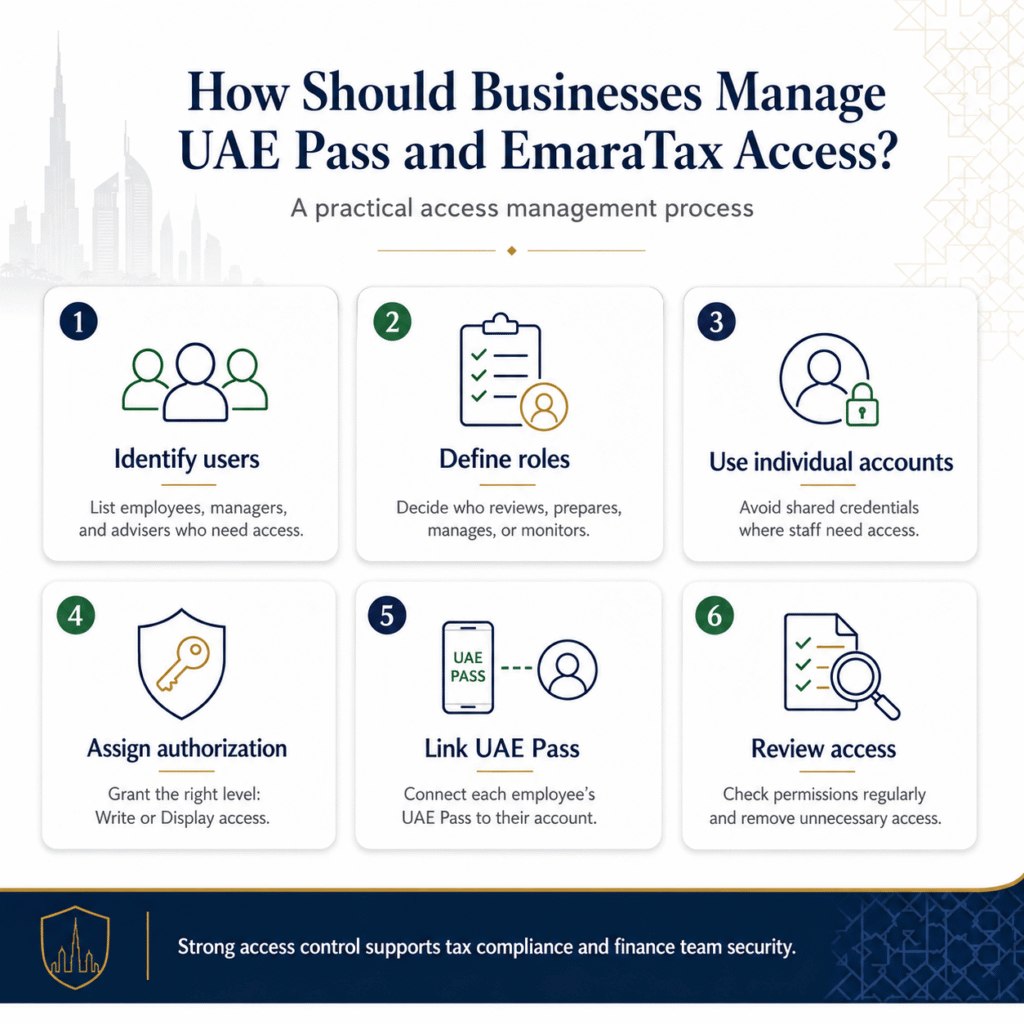
A practical EmaraTax access management process can follow several steps.
Create a list of employees, managers, and external advisers who require access to the company’s tax information.
Ask what each person actually needs to do.
Does the person need to review information, prepare tax work, manage the account or simply monitor compliance?
Where employees need access, avoid relying on shared credentials. The FTA recommends that employees in the shared-corporate-login scenario create individual EmaraTax accounts.
The account administrator can provide the relevant employee with Write or Display access through User Authorization.
Employees can then link their individual UAE Pass accounts to their individual EmaraTax accounts.
The company should periodically check who has access and whether those permissions are still necessary.
Employee offboarding should include a review of tax-system access.
When an accountant, finance manager or tax employee leaves, businesses should not simply deactivate their email account and assume the tax-access issue is resolved.
The company should review:
The FTA’s User Authorization functionality provides mechanisms for managing authorized users, making it important for businesses to include EmaraTax in their employee offboarding checklist.
A simple internal process can be:
Employee resignation → identify access → review responsibilities → change/remove authorization → assign replacement → document the change
This reduces the risk of outdated access remaining in place.
Changes to email addresses do not necessarily mean that a UAE Pass and EmaraTax account must be linked again.
The FTA explains that once the accounts are linked, a UUID from UAE Pass is stored against the EmaraTax account. That UUID remains unchanged even if the registered UAE Pass or EmaraTax email is subsequently changed.
Businesses should nevertheless keep their user information current and follow the FTA’s latest instructions when account details change.
Businesses and professionals sometimes manage more than one EmaraTax login.
The FTA states that where a user has multiple EmaraTax login credentials, their UAE Pass account can only be linked to one of those EmaraTax login emails. If one of the EmaraTax login emails matches the UAE Pass registered email, that account is automatically linked. Otherwise, the user can select the EmaraTax login account they want to link. (FTA UAE)
This is particularly relevant for finance professionals or advisers who may be involved with multiple tax accounts.
Businesses should also understand that linking UAE Pass to EmaraTax is not simply an arrangement that a user can remove whenever they want. The FTA states that users cannot directly delink their UAE Pass account from their EmaraTax account. To do so, they need to contact the FTA Contact Center.
This is another reason to think carefully about account structure and user identity before setting up access.
UAE SMEs can create a short internal policy covering tax user roles UAE businesses commonly need.
This does not need to be a complicated policy. Even a one-page access register can provide useful control.
Businesses can use this quick checklist:
A quarterly review can be useful for SMEs, while businesses with frequent employee changes may need to review access more often.
Effective tax compliance depends on more than filing returns. Businesses also need organized accounting records, clear responsibilities, and reliable finance processes.
Ripple Accountant can support UAE businesses with bookkeeping, accounting records, VAT-related support, reconciliation, and tax-compliance workflows. For companies with internal finance teams or external advisers, these processes can also help clarify who prepares financial information, who reviews it and who is responsible for tax-related tasks.
The objective is to help businesses build a structured finance function where tax compliance is part of normal operations rather than a last-minute activity.
Contact Ripple Accountant to discuss your UAE accounting requirements.
A UAE Pass account is required to use the “Login with UAE Pass” feature in EmaraTax. The FTA states that users can log in using their UAE Pass email or mobile number, or a verified Emirates ID.
The FTA specifically advises against employees linking their personal UAE Pass accounts to a company EmaraTax account where the company’s login credentials are shared. Instead, employees should create individual EmaraTax accounts and receive appropriate Write or Display access through User Authorization.
User Authorization allows an account administrator to provide employees with access to the taxable person’s EmaraTax account. The FTA refers to Write and Display access as available authorization options.
No. The FTA states that a UAE Pass account can only be linked to one EmaraTax login email when a user has multiple EmaraTax login credentials.
The company should review that person’s EmaraTax authorization and determine whether access needs to be removed or transferred as part of the employee’s offboarding process.
EmaraTax access control should be treated as an important part of a UAE company’s finance and tax processes. The objective is not to restrict employees unnecessarily, but to make sure that each person has access appropriate to their responsibilities. Good access management ultimately provides something valuable beyond security: clear responsibility, better internal control, and fewer surprises when the finance team changes.
Disclaimer: This article provides general information about EmaraTax, UAE Pass and tax-account access controls in the UAE. Procedures and platform functionality may change. Businesses should verify the latest requirements directly with the Federal Tax Authority and obtain professional advice where appropriate.
Tell us a little about your business and our UAE tax experts will get back to you with clear, practical answers — no obligation.
 Corporate Tax
For UAE businesses, missing the UAE Corporate Tax return deadline can create unnecessary compliance risks, especially when financial records, tax adjustments and…
Read article VAT
VAT
How confident are you that your construction project costs are complete and correctly recorded at month-end? For UAE contractors, subcontractor invoices can…
Read article Bookkeeping
Cash flow problems can affect even profitable UAE SMEs when customer collections, supplier payments, salaries, rent, VAT, loan repayments and other obligations…
Read articlePage 11 of 45
Book a free consultation and get clear answers for your business.
0 Comments