Corporate Tax Registration vs Filing in the UAE
Are you confused about whether registering for UAE Corporate Tax means that your company has already completed its tax filing obligation? Corporate…
Read article
How much time does your finance team spend checking bank transactions that could be matched automatically?
For many UAE businesses, bank reconciliation is still a repetitive month-end task involving bank statements, accounting records, invoices, receipts, and payment confirmations. As transaction volumes grow, manual reconciliation can become slower and more prone to missed items.
Automated bank reconciliation uses predefined rules and accounting automation to match bank transactions with accounting records, identify discrepancies, and send exceptions for human review. This allows finance teams to spend less time on routine matching and more time investigating unusual transactions and maintaining financial controls.
Automated bank reconciliation is the process of using accounting software or financial technology to compare transactions appearing in a business bank account with transactions recorded in its accounting system. Traditional reconciliation usually involves manually comparing:
With automated reconciliation, software can import or connect to bank transactions and compare them against accounting records using predefined matching rules.
For example, suppose a UAE company receives AED 12,500 from a customer. The accounting system already contains an outstanding invoice for AED 12,500 from that customer. An automated reconciliation system can identify the amount, reference, and customer information and suggest or complete the match.
However, not every transaction will match perfectly. A bank transaction might have:
These become exceptions that require investigation. Therefore, effective bank reconciliation automation is not simply about matching as many transactions as possible. It is about creating a controlled process for matching, exception management and human review.
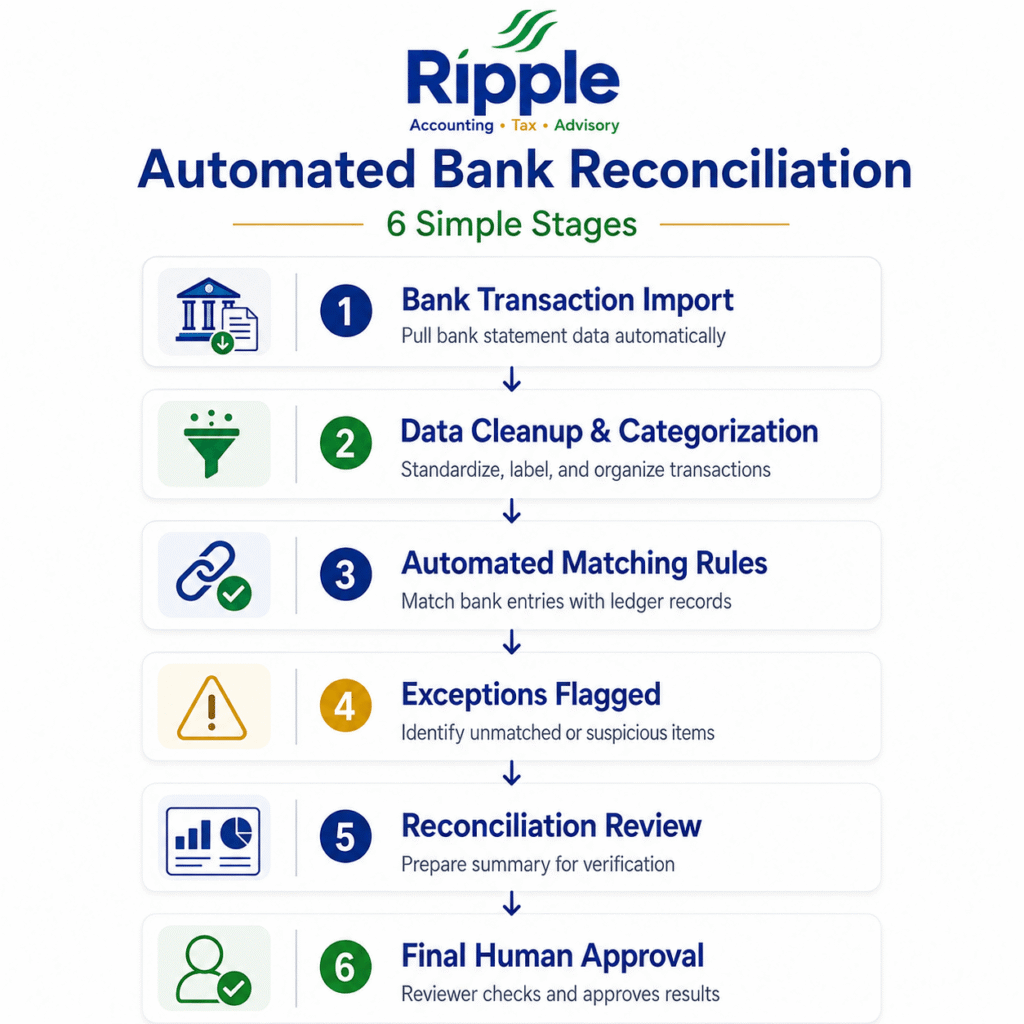
A typical automated reconciliation workflow follows several stages.
The system receives bank transaction information through a bank feed, statement upload or another supported connection.
Transactions may include:
The system compares the bank transaction with existing accounting entries. It may consider:
The software applies predefined rules to determine whether a transaction can be matched automatically. For example:
Bank receipt = AED 8,000
Outstanding invoice = AED 8,000
Customer/reference = matching
The system may automatically suggest the invoice as the corresponding accounting entry.
Transactions that do not meet the matching criteria are moved into an exception queue. This is important because an exception is not necessarily an error. It may simply mean that the transaction requires additional information.
The finance team reviews the exceptions, investigates the underlying transaction and determines the appropriate accounting treatment.
Once transactions are matched or resolved, the reconciliation can be reviewed and completed. This creates a much more efficient workflow:
Bank data → Matching rules → Automatic matches → Exceptions → Human review → Final reconciliation
The quality of automated reconciliation depends heavily on the rules used by the system. Poorly designed rules can create incorrect matches, while well-designed rules can significantly reduce repetitive accounting work.
The system can compare the amount of a bank transaction with outstanding invoices, bills or other accounting entries. For example, an AED 5,000 bank receipt may be matched against an AED 5,000 outstanding customer invoice.
Transaction references can be particularly useful when customers include invoice numbers or payment references. For example:
Bank reference: INV-1045
Accounting record: Invoice INV-1045
The system can use this information to identify a potential match.
The transaction date can also help narrow down possible matches. However, businesses should allow reasonable timing differences because the date recorded by the bank may differ from the accounting date.
Where the bank transaction contains identifiable information, the system can compare it with customer or supplier records.
The strongest reconciliation systems can use several conditions together.
For example: Amount + reference + customer + acceptable date range
This can provide greater confidence than relying on a single matching condition.
Automation should not mean that every matching rule is automatically accepted. Finance teams should determine:
The objective is controlled automation, not automation at any cost.
This is where exception management becomes important. A transaction may remain unmatched because:
Instead of forcing an incorrect match, the system should flag the transaction for investigation.
Example: Imagine a UAE company has an invoice for AED 20,000, but the bank receives only AED 19,500. Rather than automatically marking the invoice as fully paid, the system should flag the AED 500 difference.
The finance team can then determine whether:
This protects the business from inaccurate reconciliation.
Automation can process large volumes of transactions quickly, but it cannot replace professional judgement in every situation. Human review remains important when transactions are:
A useful principle is: “Automate the predictable. Investigate the unusual.”
Human review also provides an important internal control. If every transaction is automatically accepted without review, an incorrect rule or data issue could potentially result in incorrect accounting records. For this reason, businesses should establish clear review thresholds and approval procedures.
For UAE SMEs, automated reconciliation can be particularly useful as transaction volumes increase and finance teams need faster access to reliable financial information. A business may have multiple:
Manually checking each transaction can consume significant finance-team time. Bank reconciliation UAE processes should therefore focus not only on speed but also on accuracy, documentation and appropriate financial controls.
For businesses subject to UAE VAT and Corporate Tax requirements, maintaining organized accounting records is also important for supporting financial reporting and tax compliance. However, automation itself does not guarantee compliance. Businesses still need appropriate accounting policies, supporting documents and review procedures.
Automation also introduces risks if it is poorly controlled.
The solution is to combine automation with exception monitoring, review controls and periodic rule testing.
Businesses do not need to automate everything at once. A practical implementation can follow these steps.
Identify where the finance team spends the most time.
Separate transactions into:
Automate high-volume transactions with clear matching criteria first.
Define which transactions should be sent for human review.
High-value or unusual transactions may require additional review.
Review automated matches regularly to ensure that the rules are producing accurate results.
Useful measures include:
As the business changes, reconciliation rules should also evolve.
For UAE businesses, implementing accounting automation is not simply about selecting software. The underlying reconciliation process needs to be properly designed and controlled.
Ripple Accountant can help businesses strengthen their accounting processes by supporting:
The objective is to help businesses use automation where it adds value while ensuring that exceptions and important financial decisions receive appropriate professional attention.
Contact Ripple today. Our team can help you build a stronger financial foundation for confident business decisions!
Yes. Even small businesses can benefit when they have regular bank transactions and spend significant time performing manual reconciliation.
No. Automation reduces repetitive work, but accountants remain important for exceptions, judgement, review and financial controls.
Traditional bank reconciliation relies heavily on manual comparison, while automated bank reconciliation uses software and predefined rules to identify and match transactions.
They are generally treated as exceptions and require investigation or human review before the reconciliation is finalized.
It can be, provided businesses use appropriate controls, review automated matches, protect financial data and maintain accurate accounting records.
The appropriate frequency depends on transaction volume and business needs. Businesses with high transaction volumes may benefit from more frequent reconciliation rather than waiting until month-end.
Automated bank reconciliation is not about replacing the finance team. It is about giving the team a better way to work. By using reliable matching rules, businesses can automate repetitive transactions and focus human attention where it matters most: exceptions, unusual transactions, and financial judgement.
Disclaimer: This article provides general information about automated bank reconciliation and accounting automation for UAE businesses. It does not constitute accounting, tax, legal, or financial advice. The appropriate accounting processes and controls may vary depending on a business’s size, activities, systems, and transaction structure. UAE businesses should assess their individual circumstances and consult a qualified accounting or tax professional where necessary.
Tell us a little about your business and our UAE tax experts will get back to you with clear, practical answers — no obligation.
 Corporate Tax
Are you confused about whether registering for UAE Corporate Tax means that your company has already completed its tax filing obligation? Corporate…
Read article VAT
VAT
Are you a UAE-based consultancy or agency selling services overseas while managing a remote team across different countries? Cross-border business can create…
Read article Compliance
Do you receive monthly financial reports but still struggle to answer one simple question: “What actually needs my attention right now?” For…
Read articlePage 2 of 45
Book a free consultation and get clear answers for your business.
0 Comments